
What we are doing: Experimenting with the process of constructing a Huffman encoding tree and applying its encodings.
Why we are doing this: To familiarize ourselves with a new type of data structure (the binary search tree) and an algorithm for text compression.
Collaboration: Work in pairs/group of 3 for this lab.
Fixed length and variable length character encoding
We have seen how ASCII encodes every character with 8-bits (or 1 byte), regardless of how often we expect that character to occur. An alternate strategy is to have the number of bits vary for each character. Why would we do this? Presumably, we have some knowledge about which characters occur most often and which occur least often. The more frequent characters we’d like to represent with fewer bits, and we leave the less frequent characters to have longer representations. Employing this strategy, we hope that the average (or expected) message length shorter than it would be with the ASCII representation (which would be the number of characters times 8-bits.
In this lab, you will be experimenting with a type of variable-length code called the Huffman code.
Huffman coding experiments
We’ve discussed in class how to create a Huffman code. Now, we will explore the algorithm in action to gain an intuitive understanding of how it works.
Open this web page: https://people.ok.ubc.ca/ylucet/DS/Huffman.html
If you don’t see a series of buttons at the top of the screen that say things like Skip Back and Pause, scroll to the bottom of the page and click the Move Controls button. This will move the controls to the top of the screen and make the following steps easier to execute.
Set the animation speed to somewhere near the middle.
Enter hello world into the text box and click Build Tree.
Watch as the tree builds out. The labels explaining what each step is doing will probably go slightly too fast for you to read and understand. We’ll slow it down soon.
Based on what you understand and can recall about the algorithm, does this tree seem sensible? Which characters appeared most frequently in your message? How “deep” in the tree are they? Which characters appeared least frequently? Where are they in the tree?
Now, create a tree for another short phrase. This time, set the animation speed as low as it goes. Additionally, hit pause between every step. Try to predict out loud what is going to happen next in the chart building process. Then hit play and see if you were right. Do this until you feel confident that you understand the basic process of building a Huffman encoding tree.
Before you leave this tab, create the tree for hello world again.
Now, this site in another tab: http://www.csfieldguide.org.nz/en/interactives/huffman-tree/index.html
Generate a tree for hello world in this new site. Compare it to the one generated at the old site. Does the encoding change? Does the depth measure change for any of the characters? Speculate about the reason behind any differences you see.
Create a table of the encodings for your characters by tracing the path from root to leaf for each character. The table will look something like:
Character Code
h some zeros and ones
e etc
Using the tree generated for hello world at this second site (chosen because the resulting tree includes the , decode the following message:
11101100010001011000100011010011
Now, we will calculate the compression efficiency.
Compression efficiency
Remember, in ASCII every character (letter, punctuation, and space) is 8 bits. So to calculate the bits in ASCII, the formula is
number of characters * 8
In a Huffman encoding, the characters have variable lengths. You can calculate the length by measuring the depth of the node. For each node at that depth, you multiple depth by frequency. So to calculate how many bits the o’s take up in the hello world encoding on the second site, you would multiple 3 (depth) * 2 (frequency). Once you have multiplied depth * frequency for each node, you add it all together.
Then, divide the Huffman length by the ASCII length to find out how much smaller it is by percentage.
How does the size of the Huffman string for hello world compare to the ASCII size?
If time:
The following is a sorted histogram of character occurrences in the text from 80 English language novels (the numerical data may be read here if you are curious):
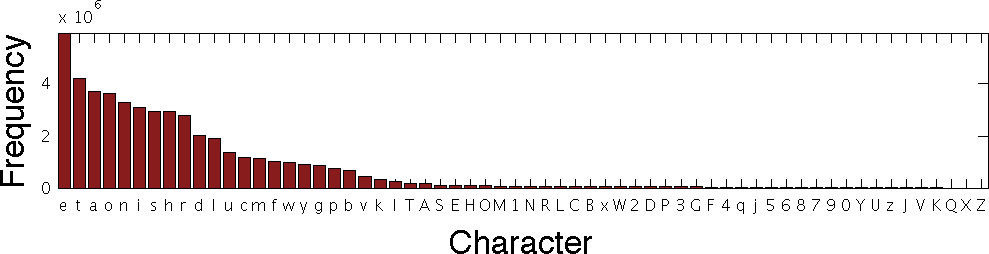
This says that, in the sample of text that was used, the character “e” appeared about 6x10E6 (or six million) times, while the character “t” appeared about four million times and so on.
What does a Huffman encoding tree look like for actually occurring text? Let’s find out.
This page features the text of the first few pages of Charles Dickens’s “A Christmas Carol.” Navigate your web browser to that page, highlight all the text (you may do so by typing Ctrl-A), and copy the text (Ctrl-C).
First, take a look at the letter frequencies here: https://www.mtholyoke.edu/courses/quenell/s2003/ma139/js/count.html
To do this, paste the text into the box. Then click Record Input, and when the frequencies return in the table, click Draw Bar Chart.
Do the frequencies agree, roughly, with the table above?
Next, create a Huffman encoding for the text here: http://www.csfieldguide.org.nz/en/interactives/huffman-tree/index.html
Compare the resulting tree to the frequencies in the word counter. How does the height of the bar for a given character correspond to the depth of that character on the tree?
What is the maximum bit size for a character? How do you think this would affect the compression percentage if you calculated it?
Acknowledgements
This lab is adapated from prior versions of the lab developed by Grinnell CS faculty.
